
I modded my Samsung UA55UE84AFULXL with an AI coding agent over the home network. The computer and TV had no direct cable connection. I handled Developer Mode, design choices, and physical remote tests; the agent changed the launcher and checked the TV through network tools.
The work produced Dot Home, native Home-button routing, and a model-specific cleanup of optional packages and services. It also exposed the limits: restart maintenance still needs an awake Windows helper, and I have no measured RAM, storage, bandwidth, or sustained TV frame-rate improvement to report.
For the visual story, read the companion build article. The repository record contains the source notes, evidence limits, and maintenance documentation.
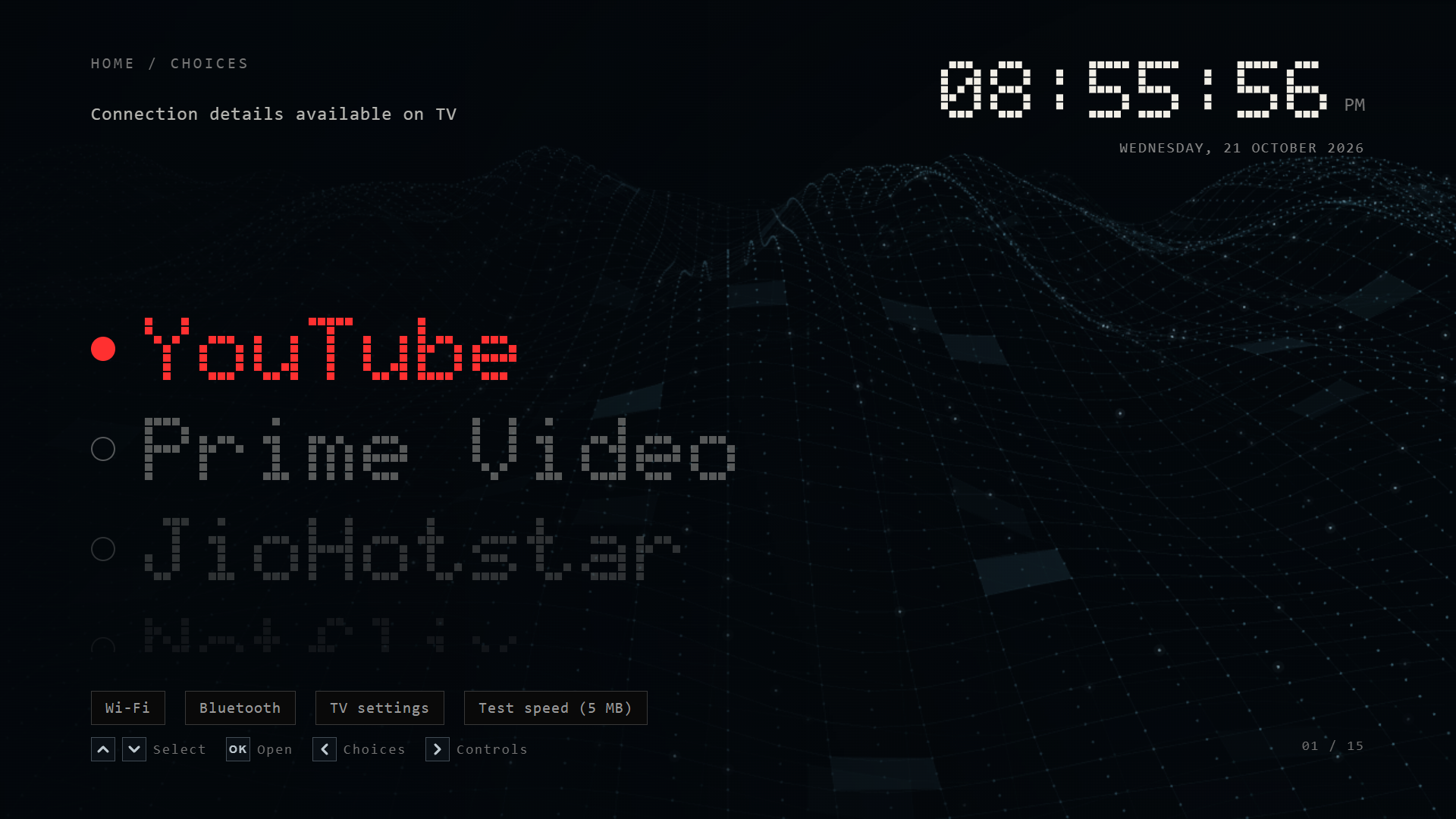
The screenshots and recording reproduce the launcher in a desktop browser. They are not live framebuffer captures. TV-only status values are unpopulated.
Version 2.0.18, recorded in a browser at 1920 × 1080 and 60 fps for 17.9 seconds. Native app loading and the central Back icon are simulated. Their timing does not measure native app performance.
The compatibility boundary
| Item | Observed value |
|---|---|
| TV model | Samsung 55-inch Crystal UHD UA55UE84AFULXL |
| Operating system | Tizen 9.0 |
| Firmware | T-KSU2EFUABC-0090-1300.9 |
| Linux kernel | 5.4.261 |
| Process architecture | 32-bit ARM, armv7 |
| SDK execution identity used by Home helper | UID 901 |
| Launcher package | DclHome001 |
| Main application | DclHome001.Home |
| Local coordination service | DclHome001.Watcher |
| Initial approved remote-navigation baseline | 2.0.12 |
| Current installed visual and transition revision | 2.0.18 |
The TV’s product information file supplied the firmware string. The native helper checks that string before it changes Home settings. It also checks process width and execution identity.
Do not weaken those checks to make another TV pass. A different result means the port needs investigation.
I did not flash a firmware partition. The launcher remained a signed Tizen web package. Privileged changes used a temporary owner-device root session and a saved device-specific baseline.
Sources, tools, and what I changed
The launcher began with AeroTizen at commit 9206a924041fda5c760470555c76e05fac1c1b2a. It supplied the launcher foundation and TV integration code.
The Home work used arn0-tv at fe09cc1050e6d1a4777eb0b92bbeade265e5b0a3. Its original target was a different TV and Tizen release. My native helper added this device’s guards and verified writes.
The privileged command route used samsung-tv-root at 4ad2c4d3b0d0e0da4b5b7ebe4a787e94596f416b. My local changes handled this firmware’s runtime discovery, script delivery, and longer command sessions.
The interface work added matrix lettering, a vertical selector, connection panels, app transitions, a dark app library, and the projected ocean. It also removed app-state polling from the launcher service.
The repository source snapshot retains upstream licenses. Native app logos remain their owners’ property. This project has no affiliation with Samsung or the streaming services.
Separate the jobs before changing anything
The build has several independent parts:
Physical remote
    -> Tizen main operation
    -> DclHome001.Home
        -> selected app or input
        -> local launch acknowledgement service

Windows maintenance helper
    -> verify device identity
    -> temporary privileged command session
    -> check fixed package allowlist
    -> reapply runtime service blocks
    -> verify state and cleanup
The launcher does not need Windows to receive Home. The maintenance helper does need the computer to keep selected background blocks applied after restart.
This separation makes failures easier to interpret. A working Home button does not prove service maintenance succeeded. An inactive service list does not prove native app playback works.
Developer mode and the first connection
The TV and computer were on the same home network. I identified the TV through its device information and network interfaces.
Samsung’s TV device guide describes the developer-mode connection process. The Host PC IP field expects the development computer’s address, not the TV’s address.
On this TV, the path went through the Apps area and App Settings. Entering 12345 opened the developer-mode dialog. The compact remote had no physical number keys. Its 123 button opened the number interface instead.
I enabled developer mode, entered the computer address, confirmed, and restarted the TV. The restart was necessary before treating the SDK connection as ready.
Use placeholders in saved commands and documentation:
# Replace the placeholder locally. Do not copy the article's text literally.
sdb connect "<TV_IP>:26101"
sdb devices
The observed SDK port was 26101. The TV also exposed application information on port 8001 and remote-control WebSocket access on 8002. Their presence did not imply root access.
I used Samsung’s SDB binary and a command-capture wrapper. Ordinary developer access did not provide a normal unrestricted root shell. The successful capture route used the root project’s SDK command runner.
Two SDB implementations also competed during the work. The official SDB server and AeroTizen’s raw transport could not own the same connection simultaneously. Stopping one before using the other avoided misleading connection failures.
What root meant in this session
The archive-based root route returned UID 0, an elevated capability set, and the expected security label. The tool checked temporary staging cleanup and unchanged protected system-file hashes after each session.
This was an on-demand privileged command route from the computer. I did not install a permanent root daemon or replace the TV firmware.
Several local adaptations mattered:
| Failure or constraint | Change |
|---|---|
TV’s dotnet --list-runtimes was unsupported | Inspect the installed shared-runtime directories instead |
| Script staging did not execute reliably through the existing delivery path | Deliver the staged script through cat piped to bash |
| Longer command batches exceeded capture time | Increase the capture budget to include command count and accept time |
| Deferred reboot kept the callback connection open | Close inherited callback descriptor 3 in the background command |
| Root command strings contained Windows carriage returns | Normalize CRLF to LF before serializing them |
The timeout adjustment used this budget:
capture_timeout = max(
    accept_timeout + 20,
    command_timeout * (len(commands) + 1),
)
These details belong to the tested route on this firmware. They are not evidence that another Samsung model supports the same root method.
A loopback SDK experiment failed. The developer Host PC restriction may have rejected the loopback address, but I did not prove that cause. I did not change the host restriction to pursue it.
A signed launcher before native Home changes
The custom source overlays are separate from the generated launcher/ directory. The build copies the pinned AeroTizen launcher, applies the custom changes, then writes the generated output.
This distinction prevents a common mistake: editing a generated file, rebuilding, and silently losing the fix.
The source snapshot supports a local build from the pinned upstream checkout:
git clone https://github.com/helalaou/AeroTizen.git
git -C AeroTizen checkout 9206a924041fda5c760470555c76e05fac1c1b2a
$env:AEROTIZEN_SOURCE = (Resolve-Path AeroTizen).Path
python docs/dot-home/source/build.py
This generates source, not a trusted ready-to-install package. Native brand assets are excluded from the repository snapshot. The wave source in the snapshot is the approved baseline.
Installation also needs the owner’s signing profile and device authorization. Use Samsung’s certificate workflow for the current toolchain. My local certificate files and passwords are deliberately excluded.
The pinned AeroTizen CLI exposes the following certificate and install route:
python -m pip install ./AeroTizen
aerotizen --tv <TV_IP> certs
aerotizen --tv <TV_IP> install docs/dot-home/source/launcher
The TV address is a placeholder. Certificate creation requires the owner’s Samsung sign-in and device authorization. The CLI signs the source directory, pushes the device profile, installs the widget, and checks the installed package list.
I used the project’s signer with its raw SDB transport after creating the certificates. The CLI commands above describe the inspected upstream entry points, not a claim that I used that exact command line for every revision.
Keep the application and package identifiers consistent between the manifest and Home helper. A successfully installed widget with a different ID will not satisfy this helper’s checks.
Before changing the system default, launch the app directly and test navigation. A visible launcher proves only that the widget can run. It does not prove the TV can boot it or dispatch Home to it.
Native Home needed two fixes
The original Home operation resolved to com.samsung.tv.csfs, Samsung Home. The saved baseline also recorded related configuration keys and the auto-start flag.
The adapted C# helper used native library calls to query the current main operation and change its default app. It ran through the SDK execution identity, with firmware and architecture checks.
The important native interfaces were:
libbundle.so.0
  bundle_create, bundle_free
libaul.so.0
  aul_svc_set_operation, aul_get_default_app
libcapi-appfw-app-operation-tv.so.0
  app_operation_set_current_app
libapp-context-manager-common.so
  util_is_appbooting_supported_webapp_byappid
libvconf.so.0
  vconf_get_str, vconf_set_str, vconf_get_int, vconf_set_int
The source snapshot includes the guarded helper. Build its managed output on the computer:
dotnet build docs/dot-home/source/Control.csproj -c Release -o <LOCAL_OUTPUT>Stage the resulting DLL, runtime configuration, and dependency metadata in the owner’s SDK tool directory. My directory was /home/owner/share/tmp/sdk_tools/dot-home-startup/. Use the established SDK capture route to create that directory, then SDB to push the build output.
The execution shapes on the TV are:
# Run through the verified SDK command-capture route, not a presumed root shell.
/usr/bin/dotnet <TV_TOOL_DIRECTORY>/DotHomeControl.dll query
/usr/bin/dotnet <TV_TOOL_DIRECTORY>/DotHomeControl.dll verify <TV_TOOL_DIRECTORY>/original-home.json
/usr/bin/dotnet <TV_TOOL_DIRECTORY>/DotHomeControl.dll apply <TV_TOOL_DIRECTORY>/original-home.json
The first query returns ARN0_QUERY= followed by JSON. Save that JSON as the device’s original-home.json before any apply. Preserve another copy off the TV. Run verify against it before apply, and query afterward.
The repository includes a sanitized sdk-command.py wrapper for this capture route. It reads TV_IP from the environment. The root tool’s source and SDB path remain explicit local dependencies.
Do not copy the entire prefixed output into the JSON file. Do not reuse somebody else’s baseline. The helper checks the saved values, package directory, and TV app-boot eligibility before applying.
The operation was http://tizen.org/appcontrol/operation/main. The helper set that operation and db/appfw/home_appid to DclHome001.Home. It preserved the saved auto-start value.
The helper did not blindly write every startup key. It recorded startup_appid, booting_appid_backup, and first_screen/type as part of the baseline. The TV later updated the startup and backup app values itself.
The first restart launched Dot Home. But Home inside Prime Video left Prime open. That separated startup success from button-dispatch success.
The missing part was the widget manifest:
<tizen:application
  id="DclHome001.Home"
  package="DclHome001"
  required_version="2.4"/>

<tizen:app-control>
  <tizen:src name="index.html" reload="disable"/>
  <tizen:operation
    name="http://tizen.org/appcontrol/operation/main"/>
</tizen:app-control>
The reload attribute requires a compatible manifest version. Leaving the older 2.3 requirement while adding the attribute was invalid.
The Tizen manifest reference documents that version boundary.
Tizen’s application-control guide explains dispatch to web applications. The registered operation let the existing app receive Home without rebuilding its whole state.
Dot Home listens for the application-control event and foreground return. It closes transient panels and schedules the return to the first item. A short debounce prevents duplicate foreground events from starting competing scrolls.
After the manifest fix in version 2.0.6, a physical Home press from Prime Video returned to Dot Home. Three updated-launcher restart tests also showed Dot Home automatically, without a host launch command.
Some restarts needed a wake packet when the TV stayed offline. These are not unplugged cold-start tests. Future firmware changes remain untested.
Samsung Home remains usable
The original fallback action exited Dot Home. With Dot Home now assigned as Home, exiting simply returned to Dot Home again.
The working action launches the Samsung app explicitly:
tizen.application.launch('com.samsung.tv.csfs');I checked this with the remote: Samsung Home opened. The physical Home button still routes through the new assignment.
Keeping Samsung Home installed reduced the need for destructive system changes. I also retained native settings, the app store, networking, Bluetooth, inputs, and SmartThings components.
Preserving those packages is not the same as certifying every feature. In particular, the project did not validate protected video playback or every DRM path.
Package cleanup used a fixed inventory
The initial inventory contained 431 packages. I selected 45 optional package registrations, kept their files, and used package-manager disable flags.
The operation shape was:
# Record of the operation, not a universal recommendation.
pkgcmd -D -t tpk -n <EXACT_REVIEWED_PACKAGE_ID>
The widget packages used -t wgt. I did not use a blanket wildcard or delete package directories. The package database supplied readback evidence, rather than trusting the command’s exit status alone.
The following is the complete build-specific inventory. Names describe package labels, not verified packet-level behavior.
| Package identifier | Type | Label |
|---|---|---|
com.samsung.tv.adplayer | tpk | AdPlayer |
com.samsung.tv.ad-web-framework | tpk | Ad Web Framework |
adplatform | wgt | Ad Player |
com.samsung.tv.targeted-ad-service | tpk | Targeted advertising |
com.samsung.tv.acr-service-app | tpk | ACRServiceApp |
com.samsung.tv.iacr | tpk | iacr |
com.samsung.tv.canalysis-service | tpk | canalysis-daemon |
com.samsung.tizen.samsung-analytics | tpk | Samsung analytics |
com.samsung.tv.pisa-service | tpk | pisa-service |
com.samsung.tv.context-aware-agent | tpk | ContextAwareAgent |
com.samsung.tv.context-aware-service | tpk | ContextAwareService |
com.samsung.tv.contents-recognition-dbmgr | tpk | Content recognition data manager |
com.samsung.tv.photo-analysis-datamgr | tpk | Photo analysis data manager |
yL49PNFmjW | wgt | Samsung Promotion |
2025ePop02 | wgt | 2025.SmartTV.Kant |
com.samsung.tv.reminder | tpk | Reminder |
com.samsung.tv.tvPlusDeeplinker | tpk | Samsung TV Plus |
com.samsung.tv.AICompanionUINotice | tpk | Vision AI Notice |
com.samsung.tv.AICompanionAgent | tpk | AICompanionAgent |
com.samsung.tv.AICompanionUILauncher | tpk | Vision AI Companion |
com.samsung.tv.AICompanionUI | tpk | AICompanionUI |
com.samsung.tv.ai-discovery-ui | tpk | AI discovery UI |
com.samsung.tv.ai-discovery-service | tpk | AI discovery service |
com.samsung.tv.bixby-context-client | tpk | Bixby Context Client |
com.samsung.tv.bixby-promotion | tpk | Bixby |
com.samsung.tv.bixby-prov | tpk | Bixby Provisioning |
com.samsung.tv.mybixby | tpk | VoiceDiscoveryMenu |
com.samsung.tv.bixbycapsuleviewer | tpk | Bixby capsule viewer |
com.samsung.tv.wakeup-engine-bixby | tpk | Bixby wakeup engine |
com.samsung.tv.ondevice-voice | tpk | On-device voice |
com.samsung.tv.voice-instant-app | tpk | Voice instant application |
com.samsung.tv.voiceassistant-music | tpk | Voice assistant music |
com.samsung.tv.utterance-recommender-service | tpk | Utterance recommender |
com.samsung.tv.gamehome | tpk | GameHome |
com.samsung.tv.gaminghub | tpk | GamingHub |
com.samsung.tv.ghdaemon | tpk | GHDaemon |
com.samsung.tv.ghservice | tpk | GHService |
com.samsung.tv.gamepadguide | tpk | GamePadGuide |
com.samsung.tv.health-mde-setting | tpk | Health settings |
com.samsung.tv.health-mde-workout-tracker | tpk | Workout Tracker |
com.samsung.tv.health-mde-service | tpk | Health service |
com.samsung.tv.ambientfte | tpk | AmbientFTE |
com.samsung.tv.ambient-support | tpk | AmbientSupport |
com.samsung.tv.ambientinfo-resources | tpk | AmbientInfo resources |
com.samsung.tv.wizard.AmbientInfo | tpk | Wizard AITech |
Per-package or per-service internet usage: not measured for every entry above and below. I did not capture baseline counters, packet traces, or a controlled observation interval. A name containing “analytics” does not establish a bandwidth number.
Disabling Bixby and voice packages intentionally removes related voice behavior. The cleanup also backed up and removed selected TV Plus automatic-start flags.
Fourteen service targets needed two mechanisms
Eight unit definitions contained existing condition-file checks. I created only the markers recognized by those definitions, under /opt/usr/share/systemd/system/.
| Unit | Condition marker basename |
|---|---|
pisa-service.service | pisa-service |
canalysis-service.service | canalysis-daemon |
com.samsung.tv.context-aware-agent.service | com.samsung.tv.context-aware-agent |
com.samsung.tv.context-aware-service.service | com.samsung.tv.context-aware-service |
com.samsung.tv.AICompanionAgent.service | com.samsung.tv.AICompanionAgent |
com.samsung.tv.ghdaemon.service | com.samsung.tv.ghdaemon |
com.samsung.tv.bixby-prov.service | com.samsung.tv.bixby-prov |
com.samsung.tv.ondevice-voice.service | com.samsung.tv.ondevice-voice |
Do not assume another unit recognizes an invented marker. I inspected the installed definitions. Their CRLF line endings also broke an exact full-line comparison, so the check used a fixed substring match.
The markers alone did not keep every target inactive in later checks. The maintenance helper therefore stops all eight after startup and verifies their state.
Six additional units used runtime masks:
media-analytics-service.service
ambient-ua-agent.service
pisa-service.socket
com.samsung.tv.voiceassistant-music.service
reminder-service.service
org.tizen.tv.sp-kpi.service
Normal persistent masking failed because the relevant filesystem was read-only. Runtime masks worked under /run, but restart cleared them. I kept that limitation instead of remounting or modifying firmware partitions.
After applying the masks, the helper stops the targets and checks ActiveState and UnitFileState. It only escalates to killing processes for the exact selected units that remain active or deactivating.
Final verification found all 14 selected service targets inactive. That is a point-in-time result after maintenance, not proof that every background Samsung process disappeared.
Why the Windows helper exists
An early verification found all package disable flags preserved. Later testing found 29 targets enabled again. The early README therefore describes an incomplete intermediate state.
I did not isolate whether restart, installation, or another firmware action caused the change. The final helper reads the existing 45-item allowlist and reapplies only missing disable flags.
Its sequence is:
- Verify the computer’s configured address and the TV’s expected network identity.
- Wait for the TV to return online and settle.
- Open the temporary privileged command route.
- Recheck and apply the fixed package allowlist.
- Mask the six runtime units and stop the eight optional units.
- Read back package counts and service states.
- Verify root-session cleanup and protected-file hashes.
- Save the successful boot identifier and result path.
The watcher checks connectivity about every eight seconds. It waits 15 seconds after reconnection before maintenance. Failed attempts back off rather than running continuously.
The helper starts at Windows sign-in. It needs the computer awake, signed in, and on the home network. The native Home assignment and Dot Home startup remain independent of it.
A Windows process-wait bug made this harder than expected. Start-Process -Wait waited for the descendant SDB server too. The privileged command had finished, but the maintenance script appeared hung.
The fix waited for the Python runner itself:
$process = Start-Process -FilePath $python -ArgumentList $arguments `
  -WindowStyle Hidden -PassThru `
  -RedirectStandardOutput $stdoutFile `
  -RedirectStandardError $stderrFile
$process.WaitForExit()
$process.Refresh()
Capturing standard output and error into separate files also prevented PowerShell error records from obscuring the runner’s actual result.
The visual implementation
The source uses HTML, CSS, JavaScript, inline SVG lettering, and Canvas 2D. It does not add a client-side framework.
Matrix lettering and row motion
Characters use a five-column, seven-row cell pattern. The renderer turns lit cells into SVG dots. That makes the app label and clock share a visual system without a font download.
The main app text is 84 pixels tall. Rows are spaced 132 pixels apart in the list coordinate system. The selected row stays at a fixed anchor, with neighboring rows progressively dimmed.
The implementation reuses existing row nodes when the list changes. Selection state uses the application key, so a refresh does not casually move focus to another app. Direction hints use chevrons for the remote’s up, down, left, and right actions.
Colors are assigned by app identity. They are repeated in the launch wash, so an app retains its visual identity during the handoff.
Two independent ocean waves
The first approved background used a corner projection. The current renderer keeps its 104-column, 72-row mesh but uses the wider ocean preview’s projection. Distant rows converge around an upper-middle horizon. The foreground spreads across and beyond the bottom of the screen.
Each point combines three moving height terms. Spatial sine and cosine values are cached once. Per-frame temporal values combine with them through angle identities:
var wave = p.sinA * cosA - p.cosA * sinA +
  (p.sinB * cosB + p.cosB * sinB) * .43 +
  (p.cosD * cosD + p.sinD * sinD) * .22;
The blue surface has full opacity. A second teal surface has opacity .38, a phase offset of 5.6, and speed multiplier -.83. It moves independently in the opposite temporal direction, rather than merely copying the first wave’s frame. A small position offset separates the ridges. A three-layer trial felt choppy and was dropped.
Each layer allocates 72 soft cell highlights and 160 dot glints, twice the previous count. Their positions and fade cycles vary. These are allocation counts, not the number visible in every frame.
Five dot brightness batches reduce repeated paint-state changes. Cell highlights and glints use eight brightness groups instead of a separate fill operation per highlight. Off-screen points skip height and brightness calculations. The backing width is capped at 1280 pixels. Frame pacing targets 60 draws per second and retains timing remainders between animation callbacks. The current motion multiplier is 1.35. The output video is 60 fps; sustained TV rendering performance has not been measured.
The code pauses when hidden, during editing, while an input view is active, and beneath the app cover. It paints a static surface for reduced-motion preferences.
Keep the clock simpler than the background
The clock retains the five-by-seven pixel glyphs and updates once per second. Hours, minutes, and seconds have two digits each. A train departure board flip was implemented and tested, then rejected after viewing it. Version 2.0.18 restores the simpler clock. That experiment was a design decision, not a reason to keep extra animation running.
Direction hints use small square key boxes. Their SVG chevrons have a centred view box, a 3.2-unit stroke, and rounded ends. Flex alignment centres the SVG vertically and horizontally in each box. The browser check measured zero offset between the icon centre and its box centre.
Launch and return transitions
The launcher clones the selected label’s SVG into its own cover. It translates and scales that label while the app color fades across the right half.
The transition lasts 460 milliseconds. The label scale reaches 1.10. On return, the movement reverses and the cover remains until the return completes.
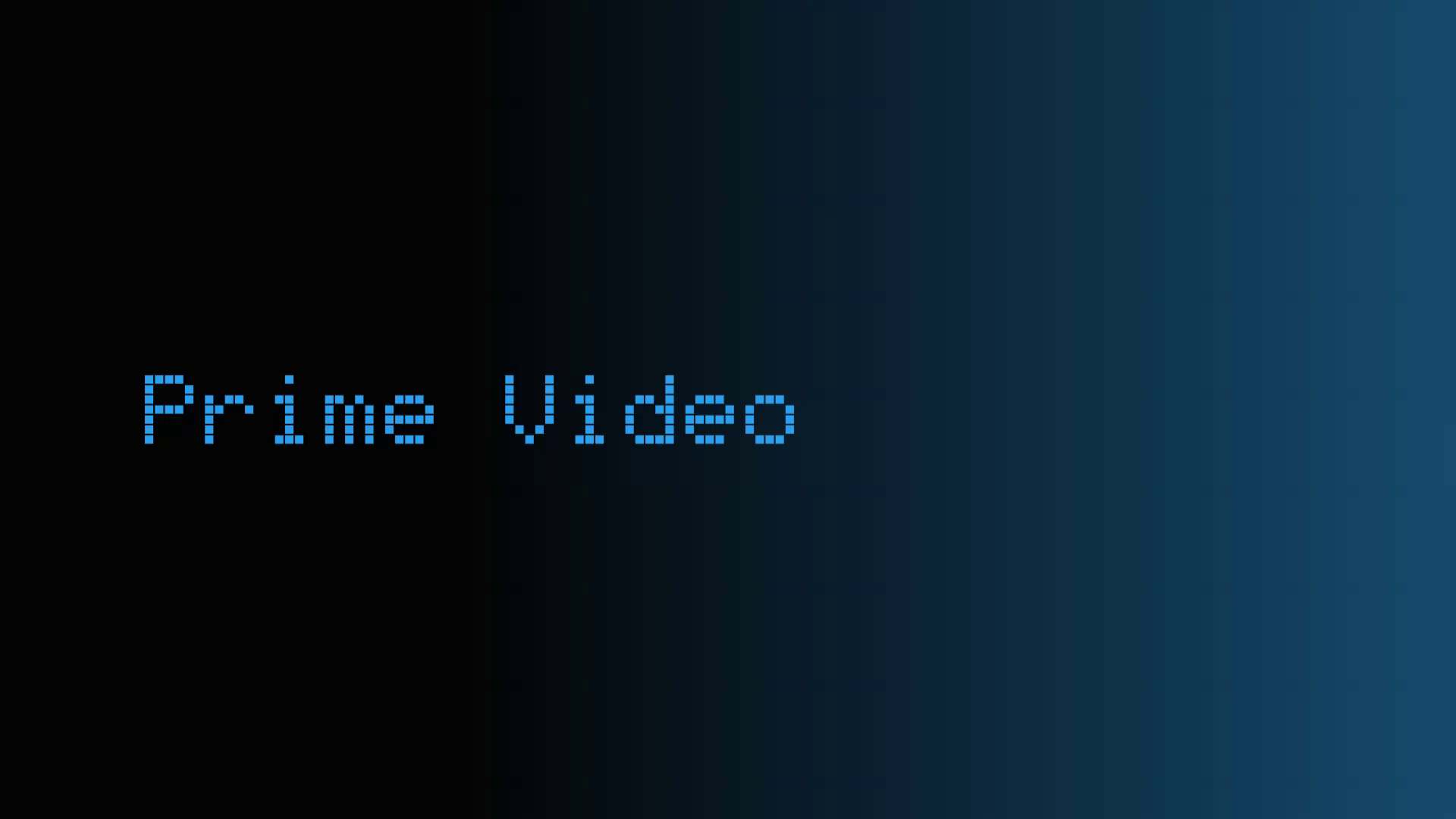
Browser capture of the custom transition. This does not measure the native app’s startup time.
The visibilitychange handler cancels timers that should not survive suspension. Without that, a resumed watchdog could remove the cover immediately and expose a broken-looking intermediate frame.
Native app composition still belongs to the TV. I improved the part I own and tested the observed result. I did not replace each app’s internal startup screen.
Version 2.0.15 fixed a separate return problem. The list’s visibility handler reset the selection to the first row while the transition still needed the original row. It now defers that reset while the cover is busy. A native Home application-control event still requests the top row after the transition. Back preserves the app and its original list position.
The browser regression starts on JioHotstar, records its label at vertical position 418 pixels, opens the cover, and returns. The intermediate label moves toward that position and finishes at 418 pixels on the same selected row node.
The recording uses a browser-only simulator, guarded by if (A.tizen) { return; }. After the faded launch page it shows black with a central spinner. Back replaces the spinner with an icon for 550 milliseconds, reveals the faded page for 350 milliseconds, then reverses the label transition. These demonstration timings do not insert a spinner into native TV apps.
Remote repeat handling
Two animation experiments failed for different reasons. Fractional hold movement made the entire list nudge without a clear selection change. A synthetic repeat timer later made one press advance twice.
Version 2.0.12 removed the synthetic timer. The first non-repeat keydown advances once. Further movement requires actual repeated keydowns after a 450-millisecond hold threshold.
Accepted repeats stay at least 65 milliseconds apart. Keyup clears input state and never changes the selection. Orphan repeats after release are ignored.
The regression case was deliberately concrete: start on Apple TV, hold a single press for 350 milliseconds, release, then deliver a late repeat. The selected app must remain Netflix.
Fast scrolling still works when the remote emits held repeats. A 22-pixel, 430-millisecond bounce only runs when fast travel reaches an endpoint. Ordinary middle-row movement does not bounce.
Home-to-top has a separate eased animation. It reads the current rendered position and moves monotonically toward the first item. Duplicate Home events are debounced.
Connection controls and honest status
The home screen labels the Wi-Fi name and signal. Four bars provide a quick visual reading. The address is masked on Home and available in the network detail panel.
Bluetooth, Wi-Fi, TV settings, and the speed test share side-to-side remote navigation. Unsupported reads show a fallback instead of fabricated values.
The RAM meter reads Tizen system information:
var total = tizen.systeminfo.getTotalMemory();
var available = tizen.systeminfo.getAvailableMemory();
var used = Math.max(0, total - available);
These APIs return memory sizes in bytes. The displayed used-memory value is a snapshot of system memory, not Dot Home’s private allocation and not a measured saving.
The speed test downloads about 5 MB only when requested. Its result includes connection and request overhead. It is not a continuous background monitor.
Storage has its own label. Middle dots separate the status items. Removing vague “memory optimized” wording made the display more accurate and easier to understand.
App library, music shortcuts, and HDMI
Customize Home uses a dark two-column app library. It refreshes the installed app list, exposes Add or On Home state, and saves the chosen order.
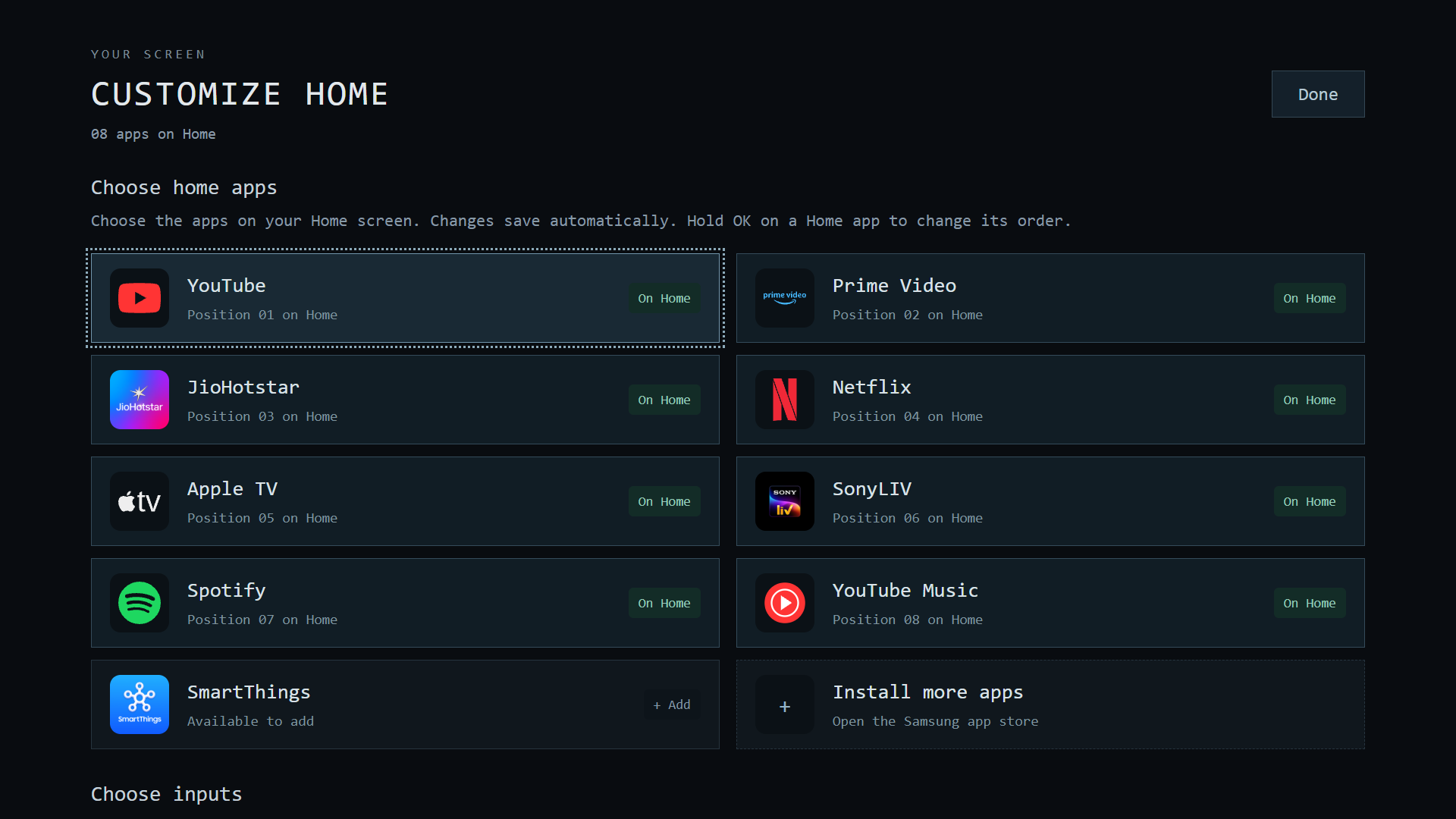
The library controls visibility in Dot Home. It does not install packages. New native apps still come from the TV’s app store, subject to model and regional availability.
The requested app order was YouTube, Prime Video, JioHotstar, Netflix, Apple TV, SonyLIV, Spotify, and YouTube Music. A one-time migration sets that order without overwriting later edits.
Spotify was already installed at version 2.1.71. Its entry was added and a launch was tested. The YouTube Music entry opens YouTube; the viewer can choose its Music section. YouTube’s TV guidance describes that route.
HDMI sources are read from the TV input integration. You can hide a source or save a friendlier launcher label. The input switch remains a native TV operation.
Brand icons needed separate attention. Generic placeholders made JioHotstar and SmartThings too similar. Local native assets and Spotify’s green mark improved recognition. The source snapshot does not redistribute extracted proprietary icon files.
The test loop and its limits
I used three kinds of evidence:
| Test surface | What it established | What it could not establish |
|---|---|---|
| Desktop browser | Layout, canvas motion, transition state, key handling | TV privileges, native app composition |
| TV SDK and privileged queries | Package flags, service state, app visibility, Home settings | Perceived remote feel, protected playback |
| Physical remote checks | Home destination, navigation feel, control actions | Exact frame timing or RAM savings |
A live-inspector attempt failed for the already-running app. The attempted stop route did not yield a usable inspector port. I therefore did not claim live browser debugging of the TV.
The device log attempt also yielded no useful application log stream. Local regression checks, explicit SDK queries, screenshots, and physical feedback carried the investigation.
Successful app launch requests do not prove protected playback. The final report preserves that gap. I tested navigation, fast scrolling, transitions, and connection controls on the TV.
Later capture tests obtained full-resolution TV screenshots through the privileged compositor route. Continuous buffer capture was less useful: the short 480 × 270 test produced about 12 fps and could capture individual surfaces. It did not provide a smooth recording of all TV screens. The published video therefore uses the launcher code in a browser, with simulated native handoff screens. Private TV screenshots are excluded.
Timing and revision record
The first signed 2.0.0 artifact was timestamped 14:39 on 21 October 2026. The initial approved 2.0.12 artifact was timestamped 18:01 that day, in IST. Later work continued through the installed 2.0.18 revision.
That artifact window is 3 hours and 22 minutes. It excludes earlier research, developer-mode setup, and root work. File times also do not measure uninterrupted human effort.
The recording experiments, return correction, and later visual revisions are outside that initial window.
| Revision or phase | Evidence-backed change |
|---|---|
2.0.0 | First signed custom-launcher artifact in the recorded window |
| Cleanup phase | 45 optional package targets; eight condition markers; six runtime masks |
| Native Home phase | Guarded helper, saved baseline, app-boot eligibility query |
2.0.6 | Manifest main-operation registration; physical Home return confirmed |
| Restart tests 2 to 4 | Updated launcher appeared automatically without a host launch request |
2.0.8 | Shared-label app cover, color wash, hidden-timer handling, labeled memory status |
2.0.9 | Dark library work and an unsuccessful fractional hold-motion experiment |
2.0.10 | Return to discrete logical selection with visual interpolation |
2.0.11 | Right-side brand preview experiment, later rejected |
2.0.12 | Actual remote repeats only; no right logo; larger text; full lower wave coverage and dot glints |
| Final remote check | Up/down, fast held movement, side controls, and transitions worked as intended |
2.0.13 to 2.0.14 | Three-wave and two-wave trials; reduced background work and increased motion speed |
2.0.15 | Preserve original selection on Back; add a browser-only handoff simulator |
2.0.16 | Single-wave comparison with richer highlights |
2.0.17 | Wider ocean projection, two independent waves, chevron hints, and a split-flap clock trial |
2.0.18 | Restore simple clock, double highlights, batch drawing, skip off-screen geometry, target 60 fps, and centre bolder chevrons |
The repository evidence ledger preserves these distinctions without publishing private raw logs. Earlier notes that say “no helper installed” or “startup unresolved” describe intermediate states, not the final build.
What I can and cannot call a benefit
The final maintenance check reported 45 disabled package targets. A separate query found all 14 selected service targets inactive.
The custom home has no ad feed. Its app list stays under the owner’s control. Native streaming apps remain responsible for their own ads, accounts, subscriptions, and content access.
I did not measure RAM savings. I did not measure storage recovery, and disabled package files remain present. I did not measure traffic per service or total bandwidth saved.
The useful next measurement would hold firmware, app state, runtime, and observation interval constant. It would record a baseline before changing package state. Re-enabling services now simply to manufacture a comparison would disturb the working setup.
If you are recreating this setup, preserve the exact compatibility checks, collect a fresh baseline, and test Home separately from startup. Treat UI screenshots as UI evidence and service queries as service evidence.
Want help with your TV skin? Email me for guidance or a custom setup. We can agree on a small fee before work starts.